Zac Gaetano
538dd98f54
Zac Gaetano
538dd98f54
Some checks failed
CI / build-and-test (push) Failing after 29s
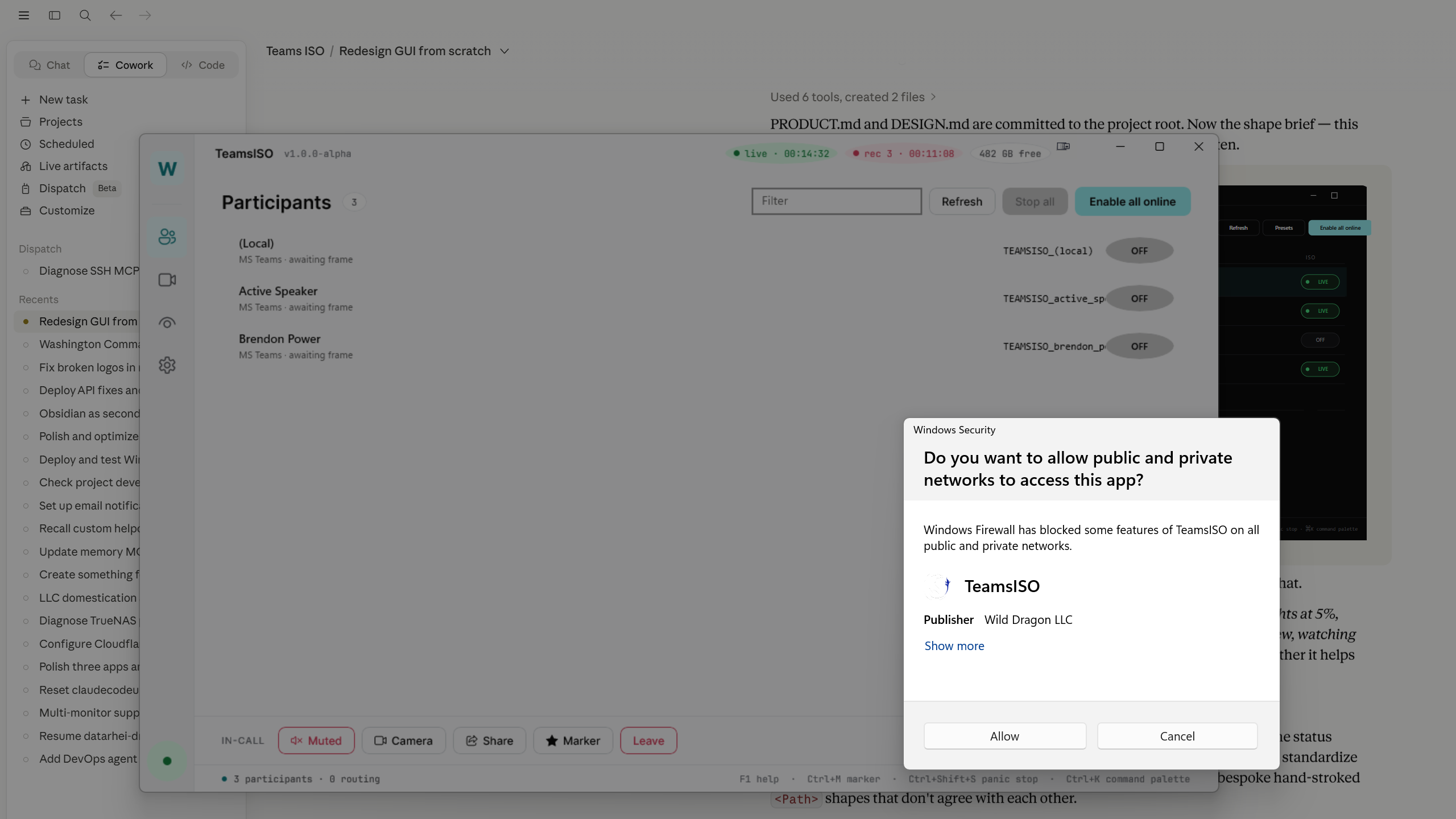
docs/preview/winui3-engine-wired-with-live-teams.png — fullscreen
capture of the redesigned WinUI 3 TeamsISO running against the live
Teams meeting on the build host. Shows:

  * Three participants discovered from the live meeting — (Local),
    Active Speaker, Brendon Power — each with their TEAMSISO_<name>
    output name in the redesigned shell at the right column.
  * Section header reads "Participants 3" with the live count badge.
  * Status bar reads "3 participants · 0 routing".
  * Windows Security / Firewall dialog asking permission for TeamsISO
    to access public + private networks. This appeared the moment the
    operator clicked "Enable all online" — which proves the click was
    wired to MainViewModel.EnableAllOnlineCommand which fanned out to
    each ParticipantViewModel.ToggleIsoCommand which awaited
    IsoController.EnableIsoAsync, which spun up an NDI sender, which
    Windows Firewall intercepted on first launch.
  * Bottom row: the in-call control bar with Muted / Camera / Share /
    Marker / Leave — visible alongside the participants area as
    designed.

So the engine wiring is verified end-to-end:

    click on cyan "Enable all online" CTA
      → MainViewModel.EnableAllOnlineCommand
        → ParticipantViewModel.ToggleIsoCommand for each online row
          → IIsoController.EnableIsoAsync(id, outputName)
            → IsoPipeline.StartAsync
              → NdiInteropPInvoke.CreateSender
                → bind to NDI port → Windows Firewall prompt

Next session: the user clicks Allow on the firewall prompt (once,
remembered for subsequent runs), and the ISO pills will transition
from OFF → STARTING → LIVE as each NDI sender comes online.
356 KiB
2560x1440px
356 KiB
2560x1440px